
Short answer: add the Youth4work connector to your AI assistant with the address https://mcp.youth4work.com/mcp, sign in to Youth4work (or create a free account) on the page that opens, and then just ask. Your assistant can then fix your profile, find jobs that match you, apply when you say yes, suggest free skill tests and read your WorkMail, all on your own Youth4work account. The connector is free for Youth4work members. Everything below was tested on a Youth4work test account on 12 October 2026.
What the Youth4work connector is
AI assistants such as Claude and ChatGPT can use outside services through “connectors” built on the Model Context Protocol (MCP). Youth4work runs one at https://mcp.youth4work.com/mcp. Once you connect it and sign in, your assistant acts as you on Youth4work, using a set of tools. A job seeker account gets 38 of them: for your profile, jobs, applications, skill tests, WorkMail and Youth4work’s public search.
Three things to know before you start:
- You stay in control. Tools that reach other people, such as applying to a job or sending a WorkMail, are marked as actions, so your assistant asks you before it runs them.
- Tests are yours to take. The assistant can suggest a skill test and give you the link, but you take the test yourself in your browser.
- Youth4work does not see your chats. It only receives the tool requests your assistant sends, such as a job search.
Full details are in the Youth4work AI connector docs.
Step 1: add the connector to your AI app
Claude
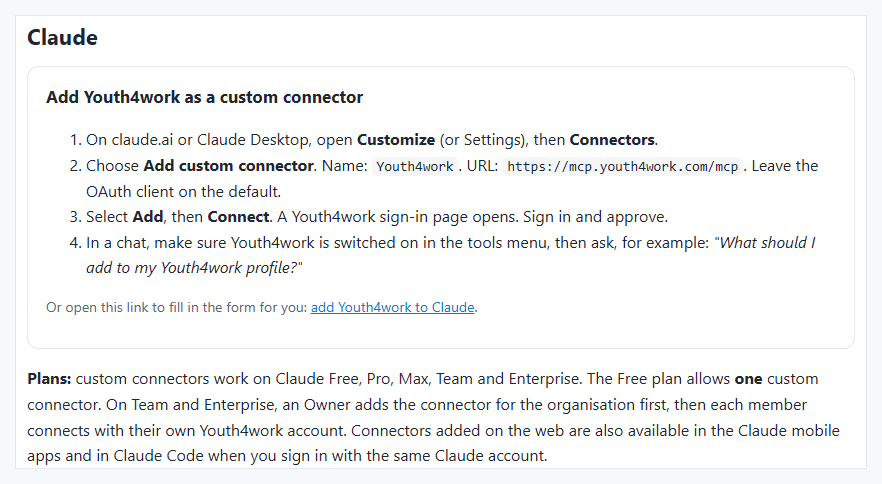
- On claude.ai or Claude Desktop, open Customize, then Connectors.
- Choose Add, then Add custom connector. Name it
Youth4workand paste the URLhttps://mcp.youth4work.com/mcp. - Select Add, then Connect. The Youth4work sign-in page opens (step 2 below).
- In a chat, check that Youth4work is switched on in the connectors menu, then ask your question.
At the time of writing, Anthropic’s help page says custom connectors work on the Claude Free, Pro, Max, Team and Enterprise plans, and the Free plan allows one custom connector. On Team and Enterprise, an Owner adds the connector for the organisation first. Menu names change from time to time: check Anthropic’s guide to custom connectors if a step looks different.
ChatGPT
At the time of writing, OpenAI’s help page says custom MCP apps (developer mode, with full support for actions) are available to ChatGPT Business, Enterprise and Edu workspaces on the web, and that a workspace admin turns on developer mode. The steps are on OpenAI’s developer mode page: create an app with the URL https://mcp.youth4work.com/mcp and OAuth sign-in. If your ChatGPT plan is not covered, use one of the other apps here.
Claude Code, Cursor, VS Code and others
- Claude Code: run
claude mcp add --transport http youth4work https://mcp.youth4work.com/mcp, then/mcpto sign in. - Cursor, VS Code and other MCP apps: add a remote (HTTP) server with the URL
https://mcp.youth4work.com/mcp. - No account and just looking? The read-only server
https://mcp.youth4work.com/public/mcpsearches public jobs, talent, mock tests and colleges without any sign-in.
Step 2: sign in, or create your account
When you connect, your browser opens Youth4work’s own sign-in page. It names the app that is asking and the site where access will go: check both before you continue.
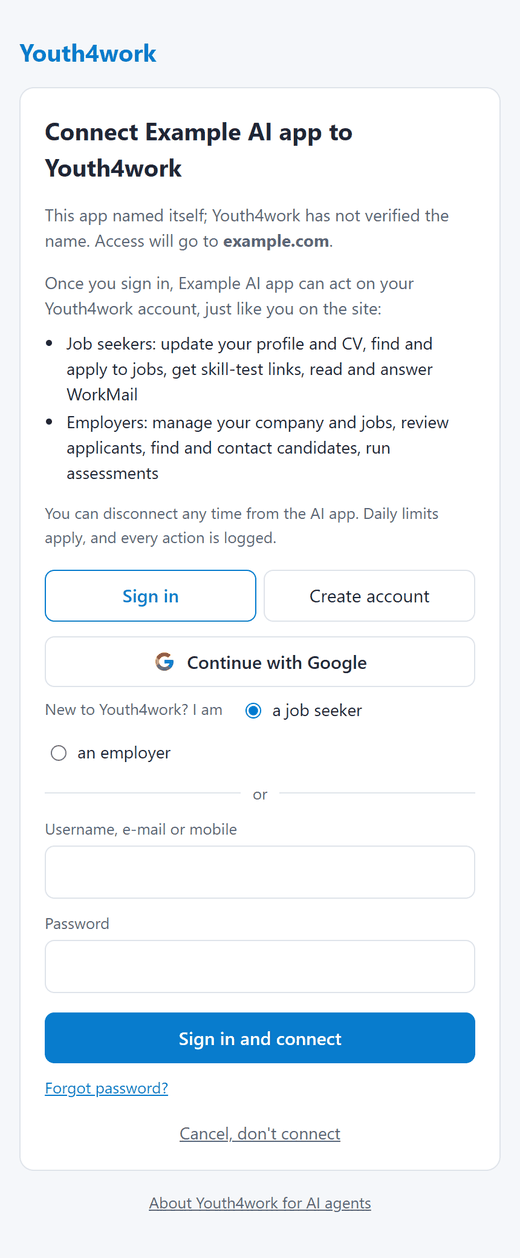
- Already on Youth4work? Sign in with your username, e-mail or mobile and password, or with Continue with Google.
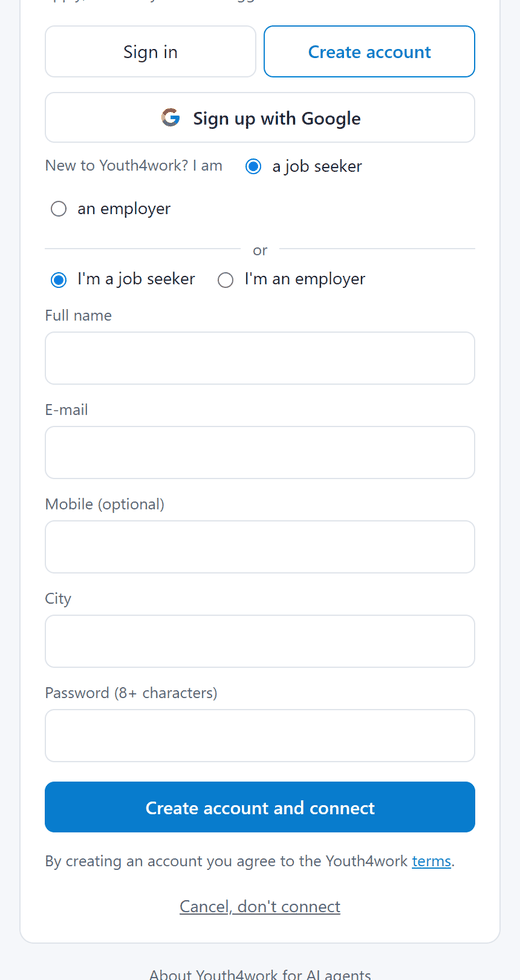
- New? Open Create account, choose I’m a job seeker, and fill in your name, e-mail, city and a password (mobile is optional). Or use Sign up with Google.
That is the whole setup. You can disconnect at any time from your AI app’s connector settings.
Step 3: what to ask (live examples)
Below are real results from Youth4work’s tools, called on our test account (y4wtest) on 12 October 2026 and shortened. The questions are examples of what you could type; your assistant chooses the tool.
1. “What should I do next on Youth4work?”
LIVE EXAMPLE · tool: get_my_next_steps
Youth4work returned:
- Profile 58% complete, 3 things missing: verify the mobile number, set the current city, add LinkedIn or GitHub links.
- 3 matching jobs to look at, each with the reason it matches (for example “your skills: Aptitude, English Language”).
- 3 free skill tests for skills on the profile (English Language, Core Java, Marketing) and 3 mock tests on Youth4work Prep.
This is the best first question: it gives your assistant a plan to work through with you, one step at a time.
2. “Set my city to Pune and update my headline”
LIVE EXAMPLE · tool: update_profile (an edit to your own profile)
Youth4work returned: updated headline and city; profile completeness went from 58% to 62%; still missing: gender and date of birth (optional) and social links.
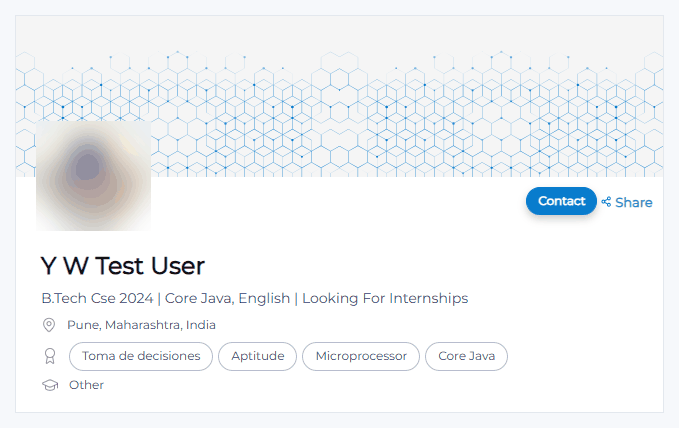
Your assistant should show you the new text and wait for your OK before it saves, and it should only use facts you give it. New headline and about text can be held for a moderator’s check; the result says so when that happens. You can also ask it to read your CV and fill in education, experience and projects, or to upload your CV.
3. “Find jobs that match my profile”
LIVE EXAMPLE · tool: recommend_jobs
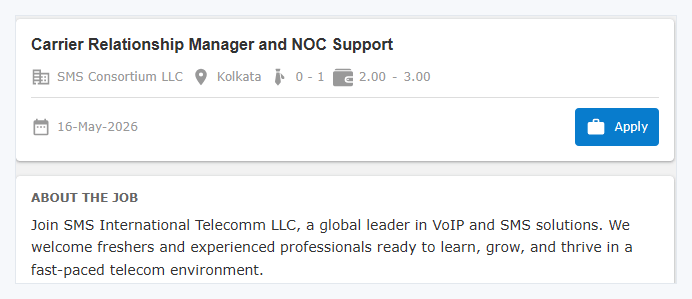
- Carrier Relationship Manager and NOC Support, SMS Consortium LLC, Kolkata, 0 to 1 years, 2 to 3 lakh a year. Why: “your skills: Aptitude, English Language”, “wants your course”.
- Telesales Executive, Panacorp Solutions Pvt, Nagercoil, 0 to 6 years, 1 to 3 lakh a year. Why: “your skills: Marketing, English Language”.
- Geography & Map Specialist (AI Community), TELUS Digital, part-time, in several cities. Why: “your skills: English Language”.
4. “Apply to the first one”
The apply_job tool is marked as an action because the employer will see your profile and CV, so your assistant asks you before it applies. Read the full job first (ask “show me the full description”, which uses get_job). There is a limit of 25 applications a day, and list_my_applications shows everything you have applied to. We did not apply to a real job for this guide.
5. “Which skill tests should I take?”
LIVE EXAMPLE · tool: recommend_skill_tests
- English Language: on your profile and asked for by matching jobs; 356,228 people compete in it. Not tested yet.
- Core Java: 348,034 competing. Not tested yet.
- Aptitude: already tested; score 59.8, rank 162 of 3,604,971.
The assistant gives you the test link; you take the free yTest yourself, signed in to Youth4work. A tested score and rank show on your profile and in recruiter searches. Our post on the most in-demand skills on Youth4work in 2026 shows which tests other members take most. Preparing for a government exam instead? See how to prepare with mock tests on Youth4work Prep.
6. “Do I have any new WorkMail?”
LIVE EXAMPLE · tool: list_workmail
2 conversations, 1 unread, newest first, each with the sender and a snippet of the last message. Opening one (read_workmail_thread) marks it read, as on the site; replying (send_workmail) is an action, so the assistant asks you first. Job seekers can send up to 30 WorkMails a day.
Tips
- Start every session with “what should I do next?” and work through the plan.
- Never let the assistant invent facts for your profile. Give it your CV or the details yourself.
- Check each job before you approve an application.
- Employers can find you more easily if your profile is public and your skills are tested.
- Hiring rather than job hunting? Read find and hire talent on Youth4work with your AI assistant.
FAQ
Is the Youth4work AI connector free?
Yes. The connector is free for Youth4work members. Your AI app may have its own plan rules for custom connectors.
Which AI apps can I use?
Any app that supports remote MCP servers with OAuth sign-in, including Claude, Claude Code, Cursor and VS Code. For ChatGPT, check which plans OpenAI currently supports on its developer mode page.
Will the assistant apply to jobs without asking me?
Applying and messaging are marked as actions that reach other people, so Claude and ChatGPT ask you before running them. Always read the job or message before you approve.
Can the assistant take a skill test for me?
No. It only gives you the link. You take the test yourself in your browser.
I don’t have a Youth4work account. Can I still try it?
Yes. Create one on the sign-in page that opens when you connect, or use the read-only public server https://mcp.youth4work.com/public/mcp to search jobs without an account.