
How to take Assessment on Youth4work ?
Get hired after your capabilities and skills tested by the Recruiters.
yAssess is the next gen of hiring candidates. Youth4work portal is providing you with a fine group of some reputed companies looking for candidates and taking assessment before the final hiring. Now, Candidates can take assessment through desktop or your own mobile phone.
Its convenient to take assessment and place yourself on Hot Seat!
Step 1: Passkey/Email ID Protected Placement Test
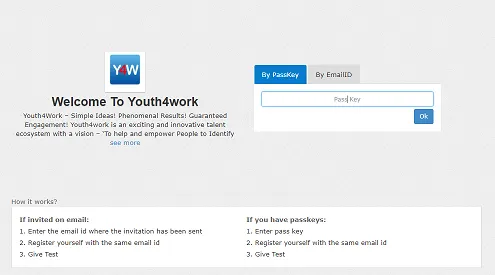
Select the job role and click on the Take Test Button. On next screen, Enter the passkey or email ID to get access to the online campus recruitment test.
Step 2: Sign Up/Sign In for the Test
New users can sign up and existing users can sign in to take the test. Only Registered Youth4work members can access the placement tests.
Step 3: Start the Online Assessment
Try a practice question and read the instructions before starting the test. Begin the test when you are prepared.
Note: Switching Tab or moving away from browser will end the assessment, avoid that.
Get Youth4work’s stories in your inbox
Join Medium for free to get updates from this writer.
Remember me for faster sign in
Step 4: Online Activity Monitoring
While assessment is going on, the browsing movements, time taken to answer questions, I.P. Address and random images are captured by Youth4work to check for any fraud.
Note- Candidates are solely responsible for any kind of malpractice and hence will be disqualified
Step 5: Score High and Get Shortlisted
The candidates are shortlisted on the basis of their scores obtained in the test. Interviews are conducted by the recruiters for the shortlisted candidates.
Step 6: Placement Offers and Jobs
Based on the test score and interview performance, candidates get placement offer by the recruiters. So start the test to grab your Dream Job.
Yassessment comes with a feature of Online Image Proctoring. It is an assessment tool that ensures the integrity of test scores attained by the candidates in a number of ways so the exam administrators can finally take sigh of relief.
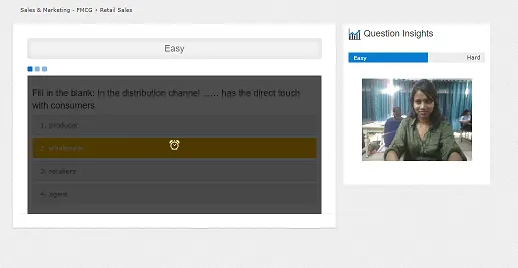
yAssess keeps close tabs on the candidate while he/she is taking the online exam through video monitoring. The Image Proctor feature activates the candidate’s webcam and takes random shots to check for unfair means of practice. Exam administrators watch the live feed of the candidate, talk to the candidate, view the test screen of the candidate, that too, live and terminate the test if the need arises.
Keep some instructions in mind:-
To attempt proctoring test on Mobile Phones, supported configurations(tested) are as follows:
- Device with front camera (with allowed permission, refer this)
- Android/windows OS with latest crome/firefox/IE Edge/safari browser only OR IOS 11 OS with latest safari browser only.